Exa 简述
最初了解到 Exa 这家公司是由于这篇文章 exa-code: fast, efficient web context for coding agents 的爆火,许多 AI 博主和频道都在谈论exa-code 这款工具。在这篇文章中,Exa 团队宣称在使用 Code Agent 工具时通过引入 exa-code,可以显著降低 LLM 生成代码的幻觉。
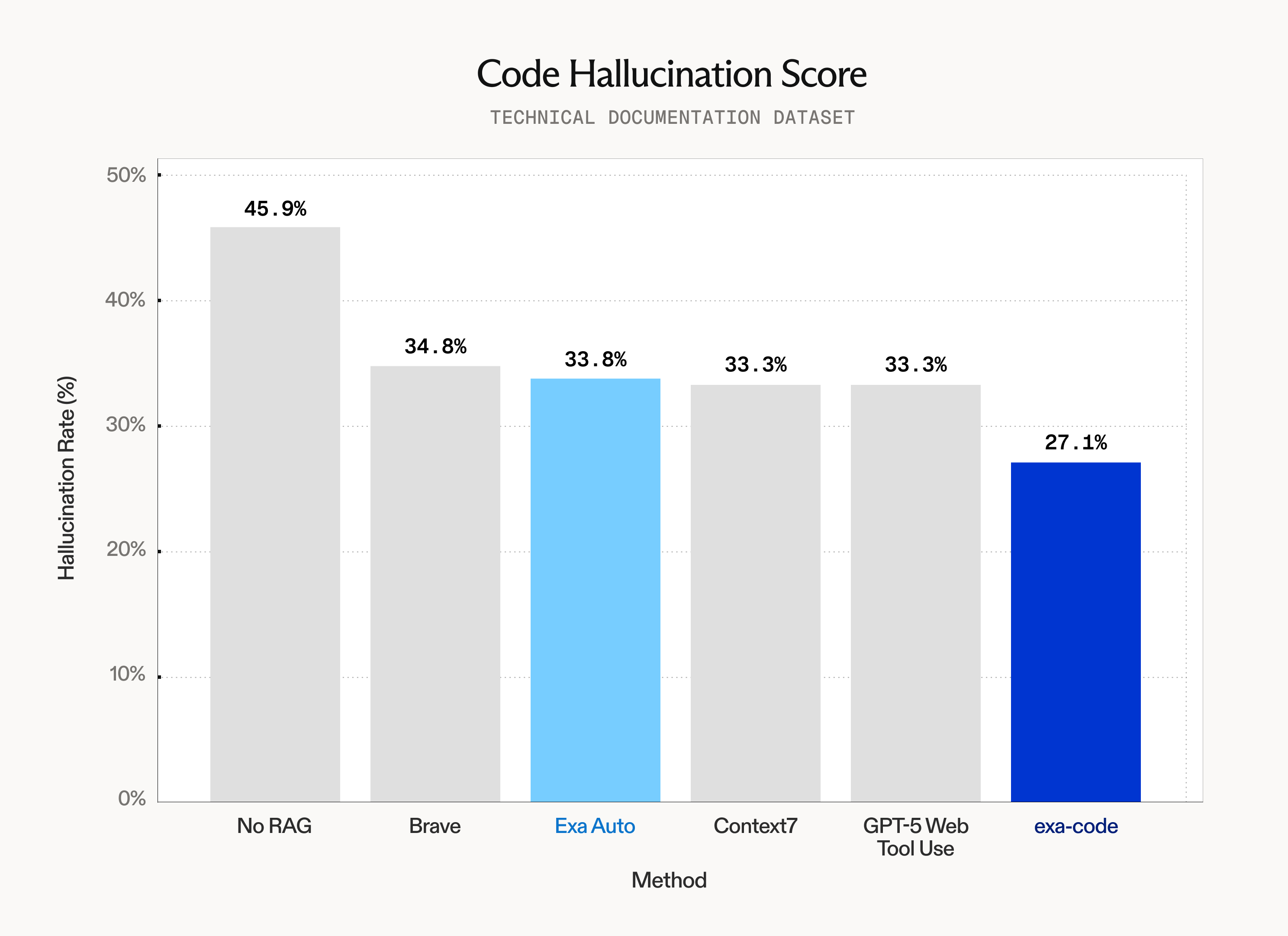
根据官方提供的数据对比图来看,目前 exa-code 是同类外部检索工具中表现最好的。目前在实际使用了一个月之后,我觉得这款工具在写代码的场景下表现不错,可以帮助大模型引入更加精确和合适的上下文信息,从而提高代码的质量和减少 bugs。
另外在了解后发现 exa 这家公司除了提供代码上下文搜索的 exa-code 之外,还支持基于语义搜索的网页检索以及内容提取等功能。但从目前我的个人评测来看,尽管其 API 服务都没有体现出远超同类产品的优势。所以个人觉得可以使用 exa-code 免费服务薅一薅羊毛。
exa-code
exa-code 声称可以搜索超过 10 亿个网页,包括不限于:
-
GitHub 代码仓库
-
官方文档页面
-
Stack Overflow 问答
同时底层实现使用混合搜索和重排序技术,会提取并返回最相关的代码片段,以减少 token 消耗和上下文大小。
代码生成测试
为了全面衡量 exa-code 代码检索能力,这里我以 Claude Sonnet 4.5 模型的代码生成为例,依次测试在不同的两个场景下使用 exa-code 前后的代码生成效果。
Typst cetz 库绘制函数图
模拟场景: 在书写论文或者课程作业时需要画图来解释文章中某些重要流程或者概念,所以这里我们假设使用 Typst 并引入 cetz 包进行函数图像的绘制,主要考虑生成代码的正确性和是否引用使用文档的最新特性。
(Typst 是一个类似于 Latex 的排版系统,在 2023/03 以开源软件的形式发布,截止目前 Github 有 47.9k 的 stars)
未使用 exa-code 的 Prompt:请你使用typst的cetz库(最新版本),为我绘制一个 x^3 在[-1,1]的函数图像呢(应该带上坐标轴) 使用web search 搜索cetz最新文档。

使用 exa-code 的 Prompt:请你使用typst的cetz库(最新版本),为我绘制一个 x^3 在[-1,1]的函数图像呢(应该带上坐标轴)使用 exa-code mcp 搜索cetz最新文档

结论:exa-code 与 Claude 原生的 Web Search 打成平手,在检索了最新的文档之后可以生成正确的代码并显示函数图像。
Python 3.12 发送 HTTP/3 异步请求
模拟场景:使用 Python 最新版本的语言特性,同时第三方库 aioquic 更新时间也相对较新,验证大模型在调用工具检索合适的文档和代码示例后,生成可以运行的程序会得到预期的结果。
未使用 exa-code 的 Prompt:你是一个 Python 专家。请生成一个使用 aioquic 库的函数(发送HTTP/3请求),实现异步发送 2 个并发 HTTP GET 请求到示例 URL( “https://cloudflare-quic.com/cdn-cgi/trace"), 解析 JSON 响应,并返回结果列表。假设库已安装。输出完整的可运行代码,包括导入和异常处理。使用 Python 3.12+ 语法。
第一次返回的代码在 H3Connection 上调用 get_next_available_stream_id 接口,会导致报错。第二次在使用自带的 Web Search 工具搜索文档之后修复了错误,成功运行并返回结果。
使用 exa-code 的 Prompt:你是一个 Python 专家,并有权访问 exa-code 工具来检索最新库文档。使用检索到的上下文,生成一个使用 aioquic 库的函数,实现异步发送 2 个并发 HTTP GET 请求到示例 URL( “https://cloudflare-quic.com/cdn-cgi/trace"),解析 JSON 响应,并返回结果列表。假设库已安装。输出完整的可运行代码,包括导入和异常处理。使用 Python 3.12+ 语法。
第一次返回的代码运行后不可用,与未使用 exa-code 的报错问题相同,同样的报错 'H3Connection' object has no attribute 'get_next_available_stream_id' (AttributeError)
在提供报错的原因之后, Claude 重新调用 exa-code 搜索得到正确结果并运行成功 ✅
# 第一次 exa-code 调用
{
  `query`: `aioquic HTTP client async GET request example Python`,
  `tokensNum`: 8000
}

# 第二次 exa-code 调用
{
  `query`: `aioquic H3Connection send_headers stream_id example python`,
  `tokensNum`: 10000
}
结论:exa-code 与 Claude 原生的 Web Search 打成平手,在第一次生成中都调用了错误的方法,并在指出问题后都可以正确修复。
API 服务
Exa 公司的产品核心在于提供 AI-frendly 的网页内容抓取及生成,其衍生的 API 服务都与此密切关联。根据目前我自己的测评来看,
Search API
根据搜索内容,自动选择传统关键词检索和语义搜索的能力,返回最相关的结果。适用于需要根据查询词找到相关网页或者AI Agent 需要获取实时网络信息。
在搜索的选项中支持多种过滤方式:
-
日期过滤(
start_published_date,end_published_date) -
信息来源的类型过滤(
company,news,gitbhu,Research Paper) -
不同搜索类型:
auto、fast、deep
这里我以我最近搜索的两个场景为例,来衡量其搜索质量和速度。
- 搜索目前研究 human computer interaction 领域并在香港中文大学工作的教授。
from exa_py import Exa

exa = Exa(api_key = "****")

result = exa.search_and_contents(
  "Search all professor who focus on human computer interaction area and work on the Chinese university of Hong kong.",
  text = True,
  type = "auto"
)
返回的结果如下(为了展示效果,删去了 text 部分),可以看出除了第一个结果和第二个结果是和香港中文大学相关之外,其余的结果大多是香港其他学校的网页。
{
  "requestId": "a6bfdb8370ece12769e3557fc9a1a7a1",
  "resolvedSearchType": "neural",
  "results": [
    {
      "id": "https://hk.linkedin.com/in/di-duan-543065170",
      "title": "Di DUAN - Ph.D. | Mobile Sensing, Human-Computer Interaction ...",
      "url": "https://hk.linkedin.com/in/di-duan-543065170",
      "publishedDate": "2025-08-11T00:00:00.000Z",
      "author": "Di DUAN",
      "image": "https://static.licdn.com/aero-v1/sc/h/9c8pery4andzj6ohjkjp54ma2",
      "crawlDate": "2025-08-11T00:00:00.000Z"
    },
    {
      "id": "https://shengdongzhao.com/",
      "title": "Shengdong (Shen) Zhao",
      "url": "https://shengdongzhao.com/",
      "publishedDate": "2024-12-05T00:00:00.000Z",
      "author": "Nuwan Janaka, Xinke Wu, Shan Zhang, Shengdong Zhao, Petr Slovák",
      "image": ""
    },
    {
      "id": "https://www.hkubs.hku.hk/wp-content/uploads/2023/09/CV-Jack-Jiang-202507.pdf",
      "title": "Curriculum Vitae of Jack Jiang",
      "url": "https://www.hkubs.hku.hk/wp-content/uploads/2023/09/CV-Jack-Jiang-202507.pdf",
      "publishedDate": "2025-07-30T00:00:00.000Z",
      "author": "Zhenhui Jiang",
      "image": ""
    },
    {
      "id": "https://www.hkubs.hku.hk/wp-content/uploads/2020/11/CV-Jack-Jiang.pdf",
      "title": "Zhenhui Jack Jiang",
      "url": "https://www.hkubs.hku.hk/wp-content/uploads/2020/11/CV-Jack-Jiang.pdf",
      "publishedDate": "2022-02-17T00:00:00.000Z",
      "author": "Zhenhui Jiang",
      "crawlDate": "2025-11-09T02:18:45.000Z"
    },
    {
      "id": "https://hub.hku.hk/cris/rp/rp01415;jsessionid=E107EB81CC79E40690BC871D008C4795",
      "title": "HKU Scholars Hub: Researcher Page",
      "url": "https://hub.hku.hk/cris/rp/rp01415;jsessionid=E107EB81CC79E40690BC871D008C4795",
      "publishedDate": "2021-11-01T00:00:00.000Z",
      "author": "Yu, Y"
    },
    {
      "id": "https://hci.cse.ust.hk/people.html",
      "title": "HKUST HCI Initiative",
      "url": "https://hci.cse.ust.hk/people.html",
      "publishedDate": "2022-01-01T00:00:00.000Z",
      "author": "",
      "image": ""
    },
    {
      "id": "https://cse.hkust.edu.hk/admin/people/faculty/profile/mxj",
      "title": "Xiaojuan MA - HKUST CSE Dept.",
      "url": "https://cse.hkust.edu.hk/admin/people/faculty/profile/mxj",
      "publishedDate": "2021-12-29T00:00:00.000Z",
      "author": "",
      "favicon": "https://cse.hkust.edu.hk/favicon.png",
      "crawlDate": "2025-10-22T01:01:45.000Z"
    },
    {
      "id": "https://cse.hkust.edu.hk/admin/people/faculty/?a=HCI&c=regular",
      "title": "Faculty | HKUST CSE",
      "url": "https://cse.hkust.edu.hk/admin/people/faculty/?a=HCI&c=regular",
      "publishedDate": "2025-08-29T00:00:00.000Z",
      "author": null,
      "crawlDate": "2025-09-10T06:04:28.000Z"
    },
    {
      "id": "https://www.cse.cuhk.edu.hk/people/faculty/",
      "title": "Faculty - CUHK CSE",
      "url": "https://www.cse.cuhk.edu.hk/people/faculty/",
      "publishedDate": "2020-12-13T19:37:48.000Z",
      "author": ""
    },
    {
      "id": "https://www.hkubs.hku.hk/people/zhenhui-jack-jiang/",
      "title": "Zhenhui Jack Jiang - HKU Business School",
      "url": "https://www.hkubs.hku.hk/people/zhenhui-jack-jiang/",
      "publishedDate": "2023-09-04T02:30:33.000Z",
      "author": ""
    }
  ],
  "searchTime": 1516.3,
  "costDollars": {
    "total": 0.015,
    "search": {
      "neural": 0.005
    },
    "contents": {
      "text": 0.01
    }
  }
}
再增加 include 条件之后,结果得到了改善,但是十条结果中有三条结果与香港中文大学无关,同时两条结果搜索到的教授并没有涉及人机交互方向。
- 搜索有关 Python 3.13 新特性 “Free-threaded Mode” 的介绍。
from exa_py import Exa

exa = Exa(api_key = "****")

result = exa.search_and_contents(
  "Search the new features "Free-threaded Mode" in Python 3.13",
  text = True,
  type = "auto"
)
返回结果如下,可以看出内容的相关性较高,并且来源于不同的网站(python 官方文档/medium/个人博客)
{
  "requestId": "5739338609357c8d6396dbff23111dd5",
  "resolvedSearchType": "neural",
  "results": [
    {
      "id": "https://docs.python.org/3/howto/free-threading-python.html",
      "title": "Python support for free threading",
      "url": "https://docs.python.org/3/howto/free-threading-python.html",
      "publishedDate": "2025-11-10T00:51:00.000Z",
      "author": "",
      "image": "https://docs.python.org/3.14/_images/social_previews/summary_howto_free-threading-python_52719009.png",
      "favicon": "https://docs.python.org/3/_static/py.svg",
      "crawlDate": "2025-11-10T01:23:26.000Z"
    },
    {
      "id": "https://docs.python.org/3/howto/free-threading-extensions.html",
      "title": "C API Extension Support for Free Threading",
      "url": "https://docs.python.org/3/howto/free-threading-extensions.html",
      "publishedDate": "2025-11-05T00:16:00.000Z",
      "author": "",
      "image": "https://docs.python.org/3.14/_images/social_previews/summary_howto_free-threading-extensions_1a0f7739.png",
      "favicon": "https://docs.python.org/3/_static/py.svg",
      "crawlDate": "2025-11-05T03:38:06.000Z"
    },
    {
      "id": "https://docs.pythonlang.cn/3.13/howto/free-threading-python.html",
      "title": "Python 自由线程实验性支持 — Python 3.13.1 文档",
      "url": "https://docs.pythonlang.cn/3.13/howto/free-threading-python.html",
      "publishedDate": "2025-01-01T00:00:00.000Z",
      "author": null,
      "crawlDate": "2025-09-09T22:44:38.000Z"
    },
    {
      "id": "https://docs.pythonlang.cn/3.13/howto/free-threading-extensions.html",
      "title": "C API 扩展对自由线程的支持 — Python 3.13.1 文档",
      "url": "https://docs.pythonlang.cn/3.13/howto/free-threading-extensions.html",
      "publishedDate": "2025-01-01T00:00:00.000Z",
      "author": "",
      "image": ""
    },
    {
      "id": "https://docs.python.org/zh-cn/3.13/howto/free-threading-python.html",
      "title": "",
      "url": "https://docs.python.org/zh-cn/3.13/howto/free-threading-python.html",
      "author": "",
      "crawlDate": "2025-07-29T12:00:23.000Z"
    },
    {
      "id": "https://abhiverse01.medium.com/pythons-multi-core-potential-exploring-free-threading-in-python-3-13-70494524fa85",
      "title": "",
      "url": "https://abhiverse01.medium.com/pythons-multi-core-potential-exploring-free-threading-in-python-3-13-70494524fa85",
      "publishedDate": "2024-12-25T00:00:00.000Z",
      "author": "",
      "image": ""
    },
    {
      "id": "https://py-free-threading.github.io/",
      "title": "Python Free-Threading Guide",
      "url": "https://py-free-threading.github.io/",
      "publishedDate": "2025-08-19T00:00:00.000Z",
      "author": "",
      "image": ""
    },
    {
      "id": "https://realpython.com/python313-free-threading-jit/",
      "title": "Python 3.13 Preview: Free Threading and a JIT Compiler",
      "url": "https://realpython.com/python313-free-threading-jit/",
      "publishedDate": "2024-08-20T00:00:00.000Z",
      "author": "Bartosz Zaczyński",
      "image": ""
    },
    {
      "id": "https://www.infoworld.com/article/3552750/get-started-with-the-free-threaded-build-of-python-3-13.html",
      "title": "Get started with the free-threaded build of Python 3.13",
      "url": "https://www.infoworld.com/article/3552750/get-started-with-the-free-threaded-build-of-python-3-13.html",
      "publishedDate": "2024-10-16T00:00:00.000Z",
      "author": "Serdar Yegulalp",
      "image": ""
    },
    {
      "id": "https://www.lucentinnovation.com/blogs/technology-posts/python-new-release-performance-improvement-python-repl",
      "title": "Whats New in Python 3.13: Performance Improvements and Python ...",
      "url": "https://www.lucentinnovation.com/blogs/technology-posts/python-new-release-performance-improvement-python-repl",
      "publishedDate": "2025-04-16T00:00:00.000Z",
      "author": "By Nidhi Inamdar",
      "image": "https://old.lucentinnovation.com/cdn/shop/files/Python_3.13_Released__Major_Performance_Upgrades_and_REPL_Enhancements_1.png?v=3106314265450623605",
      "crawlDate": "2025-10-23T09:27:33.000Z"
    }
  ],
  "searchTime": 1202.4,
  "costDollars": {
    "total": 0.015,
    "search": {
      "neural": 0.005
    },
    "contents": {
      "text": 0.01
    }
  }
}
总体来看搜索功能目前在代码开发领域的表现较高,在传统内容的检索一般般。
Find Similar
根据提供的网页,搜索类似的网页。同样支持包括日期和关键词过滤。
这里我们以 arXiv 上 Attention Is All You Need 这篇论文为例,尝试搜索其最相关的论文。
from exa_py import Exa

exa = Exa(api_key = "9d1eb3******************************")

result = exa.find_similar(
  "https://arxiv.org/abs/1706.03762",
  num_results = 10
)
返回的结果如下,仅有两条结果(如果读者有兴趣的话可以阅读这两篇论文的摘要,可以发现前者与输入论文关联性较高,而后者与 transformer 这一论文的架构和特性关联性较低),从数量和关联性两者来看,查询结果都低于预期。
{
  "requestId": "e7f271030d0b841bf50e603fe809f620",
  "results": [
    {
      "id": "https://arxiv.org/pdf/1406.1078",
      "title": "arXiv reCAPTCHA",
      "url": "https://arxiv.org/pdf/1406.1078",
      "publishedDate": "2022-02-15T00:00:00.000Z",
      "author": null,
      "score": 0.959507167339325
    },
    {
      "id": "https://arxiv.org/pdf/1706.00053",
      "title": "arXiv reCAPTCHA",
      "url": "https://arxiv.org/pdf/1706.00053",
      "publishedDate": "2022-02-15T00:00:00.000Z",
      "author": null,
      "score": 0.9511935114860535
    }
  ],
  "costDollars": {
    "total": 0.005,
    "search": {
      "neural": 0.005
    }
  },
  "searchTime": 94.99569100001827
}
Crawle Content
直接获取页面的所有内容。适用于构建内容更新的监控。
特性:
- 支持批量获取
- 返回文本、高亮、摘要等
这里测试了在不同网站抓取内容的成功率和内容完整性,发现 exa 在遇到添加了反爬的网站时无法正常工作,同时抓取无反爬网站的内容时表现较好。
| 网站 | 结果 | 内容完整性 |
|---|---|---|
| [中文论坛] https://linux.do/t/topic/1035402 | 失败 | - |
| [个人博客] https://efan404.com/posts/remark42-build-on-the-coolify/ | 成功 | 完整 |
| [论文网站] https://arxiv.org/abs/1706.03762 | 失败 | - |
| [Github 仓库] https://github.com/sst/opencode | 成功 | 完整 |
| [学校主页] https://www.cs.hku.hk/people/academic-staff | 成功 | 完整 |
Answer
针对问题使用 Exa 搜索,并用 LLM 基于搜索结果生成答案。对于明确答案的事实性问题会返回一个确定的回答,而对于开放性问题会返回带引用来源的详细总结。
这里以查询 2025 年诺贝尔物理学的获奖者 为例,检验其问答效果。
from openai import OpenAI

client = OpenAI(
  base_url = "https://api.exa.ai",
  api_key = "****",
)

completion = client.chat.completions.create(
  model = "exa",
  messages = [{"role":"user","content":"who is Nobel Prize in Physics in 2025?"}],
  stream = True
)
返回结果如下,可以看出正确列出了三位人数,并附上了信息来源 💯

同时我们尝试一个开放性问题 “目前在 AI coding 领域最好用的开源模型,列举出 top 5” ,代码如下
from openai import OpenAI

client = OpenAI(
  base_url = "https://api.exa.ai",
  api_key = "****",
)

completion = client.chat.completions.create(
  model = "exa",
  messages = [{"role":"user","content":"what's best AI open model in the world?  Give me top 5 in coding area."}],
  stream = True
)
从输出结果来看,列举的模型都是闭源模型,同时没有给出一个合理的答案。

Research
目前主流的大模型都已经集成了 Deep Research 功能,在用户给定一个 topic 后,自动搜集资料并形成一份全面系统的 report。不过由于各家大模型厂商使用不同的 Agent 构建方法和信息源,所以生成报告的速度,准确性和质量不一。
这里假设以生成一篇学术报告为例,衡量指标排序为:准确性 > 内容质量 > 速度
任务是需要调查研究 “目前 AI 是如何改变现代软件工程领域” ,调用的代码如下:
from exa_py import Exa

exa = Exa(api_key = "****")

research = exa.research.create(
  instructions = "Please review the latest research papers and tech company blogs to inform me how AI is currently transforming best practices in the field of software engineering.",
  model = "exa-research-pro",
)
for event in exa.research.get(research.research_id, stream = True):
    print(event)

# Research can also be used (without an output schema)
# directly inside chat completions
from openai import OpenAI

client = OpenAI(
    base_url = "https://api.exa.ai",
    api_key = "****",
)

completion = client.chat.completions.create(
    model = "exa-research-pro",
    messages = [
        {"role": "user", "content": "Please review the latest research papers and tech company blogs to inform me how AI is currently transforming best practices in the field of software engineering."}
    ],
    stream = True,
)

for chunk in completion:
    if chunk.choices and chunk.choices[0].delta.content:
        print(chunk.choices[0].delta.content, end = "", flush = True)
从生成的结果来看,每一段文字都可以查找到合适的论文或者公开的报告。准确性还不错,同时生成的速度合理(花费163秒),但是生成的质量较为一般,只是在总结和归纳已有的资料内容,并没有足够的深度和全面性。完整结果可以查看如下的 JSON 片段
价格对比
截止目前 2025/11/10, exa-code 价格如下,
| Function | Price | Description |
|---|---|---|
| Search | $5.00 | / 1k neural/auto searches (1-25 results) |
| $25.00 | / 1k neural/auto searches (26-100 results) | |
| $2.50 | / 1k keyword searches (1-10 results) | |
| Content | $1.00 | / 1k pieces of content |
| Answer | $5.00 | / 1k answers |
| Research | $5.00 | / 1k agent searches |
| $5.00 | / 1k exa-research agent page reads | |
| $10.00 | / 1k exa-research-pro agent page reads | |
| $5.00 | / 1M reasoning tokens |
在 Search API上目前同类产品 Perplexity 的 Search API价格同样为 $5/1k,而 Tavily 的价格为 $8/1k,价格不具有特别的优势。
(content/answer/research 功能个人觉得相比较同类产品没有优势,所以在这里不进行比较
同类型工具对比
目前市面上除了 exa 提供 AI-frendly 的网页内容检索功能之外,同类型的公司有如下:
- Perplexity API: 侧重端到端答案生成。
- Tavily: 专注AI Agent的搜索API。
- Firecrawl: 侧重于网页爬取与数据提取功能。
之后会依次使用并对比测评,如果喜欢的话可以持续追踪我的主页~